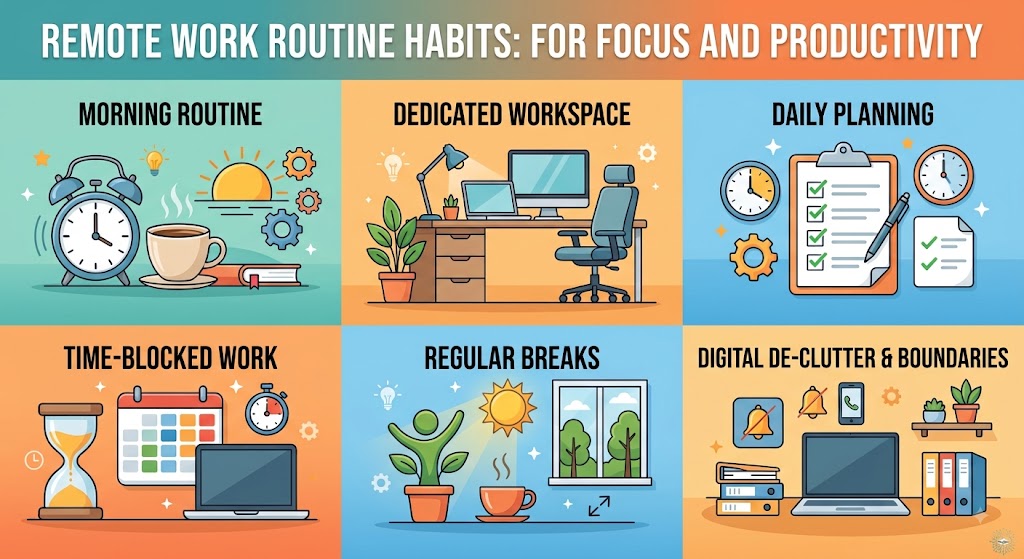
Working from home can offer flexibility that traditional office routines often cannot. There is no daily commute, fewer interruptions from a busy office environment, and more freedom to organize your surroundings. At the same time, that freedom can create a new challenge: without a clear routine, the workday can easily become scattered.
You might begin working later than planned, check messages before deciding what actually matters, move between tasks without finishing anything, or continue working long after you intended to stop. These habits can make remote work feel exhausting even when the workload itself is reasonable.
A dependable routine can solve many of these problems. The goal is not to create a rigid schedule where every minute is planned. Instead, a good remote-work routine provides enough structure to help you know when to start, what to focus on, when to take a break, and when to finish.
The most effective routine is also realistic. It should fit your responsibilities, your working hours, and the type of work you actually perform. A routine that looks impressive on paper but is impossible to maintain will not help for very long.
Create Structure Without Making Your Day Rigid
A useful routine gives your day a dependable rhythm while leaving enough flexibility for unexpected calls, urgent tasks, and changes in priorities.
Start the Day Before You Start Working
One of the easiest ways to improve remote productivity is to create a clear transition between personal time and work time.
When your office is only a few steps away, it can be tempting to open your laptop immediately after waking up. Although this may seem efficient, starting the day without preparing mentally can make the entire morning feel rushed.
Give yourself a short period to get ready, have breakfast or coffee, review your schedule, and decide what deserves attention first.
You do not need an elaborate morning ritual. Even 15 to 30 minutes of preparation can create a useful boundary between the start of your day and the beginning of your work.
Get ready before opening work apps.
Look at your priorities for the day.
Start with a clear first task.
Choose Your Most Important Tasks
Remote workers often have access to numerous communication channels, documents, meetings, and small tasks. If you begin the day by responding to everything that arrives, your priorities can quickly become controlled by other people’s requests.
Instead, identify the tasks that matter most before getting lost in minor activities.
Choose two or three important outcomes for the day. These do not have to be enormous projects. They can be meaningful steps toward larger goals.
Once those priorities are clear, schedule time to work on them before spending too much time on low-value tasks.
Ask Yourself One Question
“If I can only complete a few meaningful things today, which ones will make the biggest difference?”
Create Blocks of Focused Work
Trying to work continuously for an entire day can reduce concentration. Instead, divide your schedule into blocks that have a specific purpose.
For example, you might dedicate the first part of the morning to focused project work, reserve late morning for communication, take a lunch break, and use the afternoon for meetings or administrative tasks.
The exact schedule will depend on your job. Someone who works with customers may need to remain available throughout the day, while someone who writes or develops software may benefit from longer periods of uninterrupted focus.
The important idea is to give your brain a clear task instead of constantly switching between unrelated activities.
Control Notifications
Notifications are one of the biggest sources of distraction during remote work. A single message may take only a few seconds to read, but the interruption can make it harder to return to the task you were doing.
Turn off unnecessary alerts when you are working on something that requires concentration. If your job allows it, check messages during specific periods instead of responding instantly to every notification.
This does not mean ignoring colleagues. It means creating a reasonable balance between being available and protecting your ability to concentrate.
Not Every Message Needs an Immediate Response
Separate urgent communication from routine updates. Clear expectations about response times can help teams communicate effectively without creating constant interruptions.
Take Real Breaks
A productive routine should include breaks rather than treating breaks as wasted time.
When you work from home, it is easy to eat lunch at the desk, scroll through messages while eating, or continue working because there is no physical office closing around you.
Try to step away from the screen during breaks. Get some water, walk around, stretch, prepare food, or simply sit somewhere different for a few minutes.
Short pauses can help separate one task from another and make it easier to return with a fresh perspective.
Your lunch break can also provide a useful midpoint in the day. When possible, leave the workspace instead of treating lunch as another opportunity to work.
Leave the screen during meaningful breaks.
Walk around or change position.
Return with a clear next task.
Keep Meetings Under Control
Meetings can quickly take over a remote workday. A calendar filled with video calls can leave little time for completing the work discussed during those meetings.
Whenever possible, understand the purpose of each meeting before attending. If a meeting is unnecessary for your role, consider whether a written update would provide enough information.
For meetings you do need to attend, keep notes about decisions and follow-up tasks. This prevents you from relying on memory after several calls throughout the day.
After a meeting, take a few minutes to identify what action is required. This small habit can prevent important tasks from disappearing into your inbox.
Create a Dedicated Work Area
Your environment can influence how easily you enter work mode. If possible, create a specific area that is associated with work.
This does not have to be a separate room. A desk in a bedroom, a quiet corner of the living room, or another practical location can work.
Keep the area reasonably organized. Remove unnecessary objects, manage cables, and keep frequently used items within reach.
When the workday ends, cleaning the area can become part of your closing routine. This creates a physical signal that work is finished.
Make Your Workspace Easy to Reset
A workspace that takes only a few minutes to organize is much easier to maintain than one that requires a major cleanup every weekend.
Use a Simple To-Do System
A long task list can sometimes create more stress than productivity. When everything is marked as important, it becomes difficult to know where to begin.
Keep your daily list short and realistic. Separate tasks that must happen today from tasks that can wait.
You can also group similar tasks together. For example, respond to routine emails during one period instead of checking them repeatedly throughout the day.
At the end of the workday, move unfinished tasks to another date instead of allowing them to remain indefinitely on today’s list.
Build Boundaries Around Your Workday
One of the biggest advantages of remote work can also become one of its biggest problems: flexibility.
Without a commute or physical office closing time, work can stretch into evenings and weekends. Over time, this can make it difficult to mentally disconnect.
Set a general finishing time whenever your job allows it. Your schedule does not need to be identical every day, but having a target helps create a boundary.
When you finish, close work applications, put away your equipment, and physically leave your workspace if possible.
This simple routine can help separate professional responsibilities from personal time.
Give Tomorrow a Clean Starting Point
Spend five minutes reviewing unfinished work, writing tomorrow’s first priority, organizing your desk, and closing unnecessary applications. Starting the next morning with a clear plan can reduce decision fatigue.
Avoid Trying to Copy Someone Else’s Routine
Productivity advice often presents a perfect morning schedule, but remote workers have different responsibilities and energy levels.
You do not need to wake up extremely early, work for twelve hours, or follow a complicated productivity method to have a successful workday.
Some people focus best in the morning. Others become more productive later in the day. Some jobs require frequent communication, while others allow long periods of independent work.
Use productivity techniques as ideas rather than strict rules. Test a habit, see whether it improves your day, and keep it if it works.
Make Your Routine Flexible
A good routine should survive an imperfect day.
Unexpected calls, family responsibilities, technical problems, urgent requests, and changing deadlines are normal parts of working from home. If your schedule collapses every time something unexpected happens, it may be too rigid.
Instead of planning every minute, create a few important anchors: a consistent start, focused work periods, regular breaks, and a clear finish.
Everything between those anchors can remain flexible.
| Part of the Day | Useful Habit | Purpose |
|---|---|---|
| Morning | Review priorities | Start with direction |
| Focus Block | Work without unnecessary notifications | Protect concentration |
| Midday | Take a real break | Reset attention |
| Afternoon | Handle meetings and smaller tasks | Maintain progress |
| End of Day | Plan tomorrow and reset workspace | Create a clean finish |
Track What Actually Works
If you are trying to improve your remote routine, do not change everything at once. Choose one or two habits and test them for a week.
Pay attention to whether you finish important work more consistently, feel less distracted, take better breaks, or finish the day with less stress.
If a particular habit does not help, change it. Productivity is personal, and the best routine is the one that makes your actual working life easier.
Over time, you can build a routine that feels natural instead of something you constantly have to force yourself to follow.
Frequently Asked Questions
What is a good routine for working from home?
A good routine usually includes a consistent starting point, clear daily priorities, focused work periods, regular breaks, controlled notifications, and a defined end to the workday.
How can I stay focused while working remotely?
Choose a small number of important tasks, reduce unnecessary notifications, work in focused blocks, keep your workspace organized, and avoid constantly switching between unrelated tasks.
How long should remote workers work before taking a break?
There is no universal schedule. The right timing depends on your work and personal preferences. The important thing is to take meaningful breaks before fatigue and distraction become overwhelming.
How can I stop working too late when I work from home?
Set a general finishing time, complete a short end-of-day routine, close work applications, organize your workspace, and physically step away from the work area when possible.
Should I follow the exact same schedule every day?
Not necessarily. A flexible routine is often more practical. Keep a few consistent anchors, such as your start time, focus periods, breaks, and finishing routine, while allowing the rest of the day to adapt.
A Productive Remote Day Starts With a Repeatable Rhythm
Remote work becomes easier when your day has enough structure to keep you focused without removing the flexibility that makes working from home valuable.
Start with simple habits: prepare before work, identify your priorities, protect focused time, control notifications, take genuine breaks, and create a clear ending to the day. You do not need a perfect routine. You need one that you can realistically follow again tomorrow.