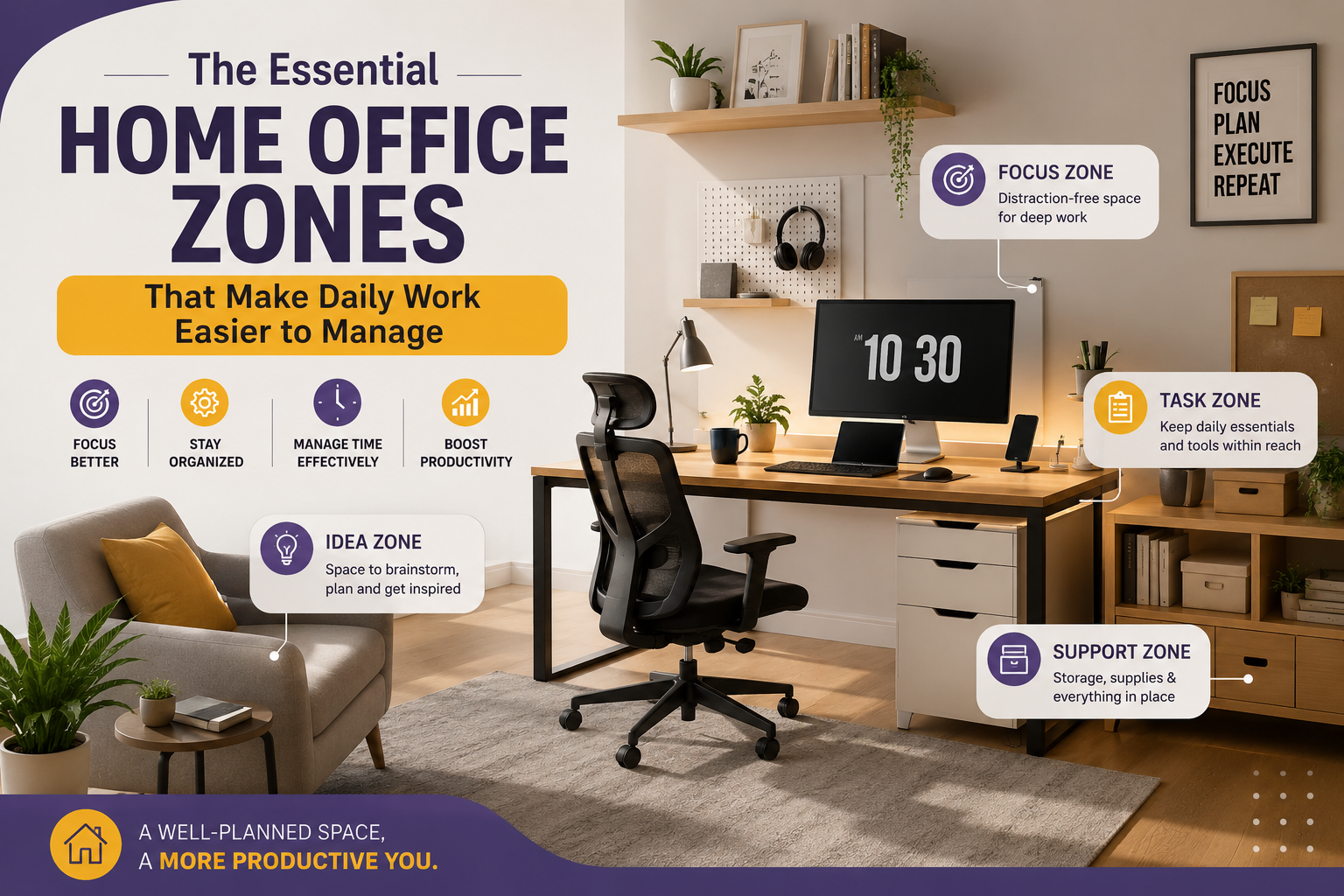
Dividing your workspace into simple, functional zones helps create better organization, smoother daily routines, and a more comfortable environment for focused work at home.
A well-designed home office is more than just a desk and chair. One of the easiest ways to improve productivity is by creating dedicated areas for different tasks. The essential home office zones that make daily work easier to manage help reduce clutter, improve efficiency, and create a workspace where everything has a clear purpose.
Whether your office occupies an entire room or a small corner of your home, organizing it into practical zones allows you to move naturally between tasks without wasting time searching for supplies or constantly reorganizing your desk.
Why Workspace Zones Improve Productivity
Many people work from a single crowded desk where documents, electronics, office supplies, and personal items compete for space. Over time, this clutter makes it harder to stay organized and focused.
Creating separate work zones keeps similar activities together. It also helps establish routines that make each workday feel more structured while reducing distractions and unnecessary movement.
The Essential Home Office Zones That Make Daily Work Easier to Manage
1. Primary Work Zone
This is the heart of your home office. It includes your desk, chair, monitor, keyboard, and the tools you use most often. Keep this area as clean as possible so your attention remains on your current task.
2. Storage Zone
Dedicate shelves, drawers, or filing cabinets to office supplies, paperwork, chargers, and accessories. Organized storage reduces clutter while making important items easier to locate.
3. Planning Zone
Create a small space for calendars, notebooks, planners, or whiteboards. Reviewing priorities in one location helps you start each day with clear direction.
4. Technology Zone
Keep printers, routers, charging stations, cables, and backup devices together. Managing technology in one area simplifies maintenance and prevents tangled cables around your main desk.
5. Break Zone
If space allows, include a comfortable chair or small corner where you can briefly relax, stretch, or enjoy a drink before returning to work refreshed.
How to Set Up Each Zone Efficiently
Creating dedicated work areas doesn’t require a large room. Even compact offices benefit from simple organization and thoughtful placement of furniture and equipment.
Step 1: Identify Daily Activities
List the tasks you perform every day. This helps determine which zones deserve the most space and which can remain smaller.
Step 2: Arrange Furniture Around Workflow
Position frequently used items close to your primary workstation while placing occasional-use equipment nearby but out of the way.
Step 3: Minimize Visual Clutter
Store paperwork, cables, and office supplies inside drawers or containers whenever possible. Open surfaces encourage better focus.
Step 4: Label Storage Areas
Simple labels help maintain organization and reduce the time spent searching for documents or office supplies.
Step 5: Review Your Setup Regularly
As your work changes, adjust your zones to match your current workflow instead of keeping an outdated layout.
| Office Zone | Main Purpose |
|---|---|
| Primary Work Zone | Focused computer work and daily tasks. |
| Storage Zone | Organizes supplies and important documents. |
| Planning Zone | Tracks schedules, goals, and priorities. |
| Technology Zone | Houses printers, chargers, and accessories. |
| Break Zone | Encourages short rest periods during the day. |
Keeping Your Workspace Functional Every Day
Good organization depends on consistent habits. Spend a few minutes each evening putting supplies back in their proper places, clearing your desk, and preparing for the next workday.
Regular maintenance prevents clutter from building up and ensures each zone continues serving its intended purpose. Small daily routines are easier than major cleanup sessions later.
Common Mistakes to Avoid
- Using one desk area for every activity.
- Allowing paperwork to pile up.
- Keeping unused equipment on your desk.
- Ignoring cable management.
- Creating storage without an organization system.
- Skipping regular workspace cleanup.
Daily Home Office Checklist
- ✔ Main desk remains uncluttered.
- ✔ Office supplies are stored neatly.
- ✔ Planner or calendar is updated.
- ✔ Devices are charged and organized.
- ✔ Break area stays clean and inviting.
- ✔ Workspace is prepared for tomorrow.
Helpful Resource: OSHA Ergonomics
Frequently Asked Questions
Do I need a large room to create office zones?
No. Even a compact workspace can include separate functional areas by using shelves, drawers, and thoughtful organization.
Which office zone is most important?
The primary work zone should receive the most attention because it’s where you spend the majority of your workday.
How often should I reorganize my office?
Review your setup every few months or whenever your work routine changes significantly.
Can storage be part of my desk?
Yes. Desks with built-in drawers or cabinets are excellent for smaller home offices because they reduce clutter while saving space.
Conclusion
The essential home office zones that make daily work easier to manage provide structure, reduce distractions, and help create a more efficient work environment. By separating your workspace into clearly defined areas for focused work, planning, storage, technology, and short breaks, you can improve organization while making everyday tasks feel simpler and more manageable. A well-planned workspace supports productivity without requiring a large room or expensive furniture.